
What Happens After SMTP Configuration in ScholarJMS?
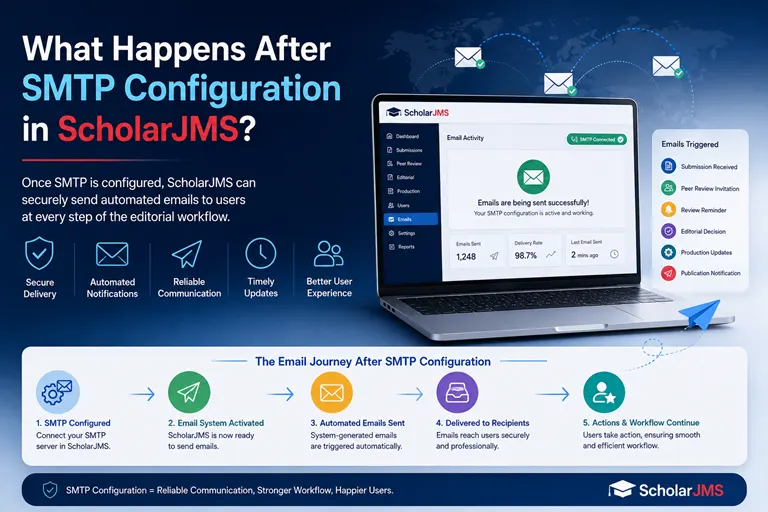
Learn how SMTP configuration enables automated email notifications in ScholarJMS, including submission acknowledgements, new manuscript alerts and important journal workflow emails.
Why Is SMTP Configuration Important for a Journal Website?
A modern academic journal website does much more than display the journal title, editorial board, archives and published articles.
It needs to communicate automatically with authors, editors, reviewers and journal administrators.
When an author submits a manuscript, the system should ideally acknowledge the submission immediately. The journal office should also know that a new manuscript has been received. As the manuscript moves through peer review and editorial processing, different participants may need to receive different notifications.
This is where SMTP configuration becomes extremely important.
In ScholarJMS, SMTP configuration connects your journal website with an email server so that the system can send emails using your configured email account.
For a journal website owner, this means that once SMTP is successfully configured and tested, your ScholarJMS website can begin functioning as a proper communication system rather than simply being a website for displaying journal information.
What Is SMTP in Simple Terms?
- SMTP stands for Simple Mail Transfer Protocol.
- You do not need to understand the technical details to understand its purpose.
- Think of SMTP as the mail delivery mechanism for your journal management system.
- Your ScholarJMS website generates an email notification when a particular event occurs. SMTP helps deliver that email to the intended recipient.
For example:
| Author submits manuscript | → | ScholarJMS processes the submission | → | ScholarJMS generates notification emails |
| ↓ | ||||
| Author receives submission acknowledgement | ← | SMTP server sends the emails | ← | SMTP server sends the emails |
| ↓ | ||||
| Journal office receives new submission notification | ||||
This automated communication is one of the important components of a professional online journal workflow.
What Does SMTP Configuration Enable in ScholarJMS?
After successful SMTP configuration, your ScholarJMS based journal website can send various system generated emails.
Depending on the workflow and configuration of your journal, these notifications can include:
1. New Manuscript Submission Acknowledgement
- When an author successfully submits a manuscript, ScholarJMS can automatically send an acknowledgement to the email address provided by the author.
- The author can receive confirmation that the submission has been successfully received.
- This eliminates the need for the journal office to manually send a confirmation email for every submission.
2. New Submission Notification to the Journal
- At the same time, the journal's configured email address can receive a notification that a new manuscript has been submitted.
- For example: Journal Email:
journalname@institution.edu - The journal office can receive an automated notification containing relevant submission information.
- This allows the editorial team to know that a new manuscript has entered the system.
3. User Registration Emails
- If your journal allows authors, reviewers or other users to register through the website, SMTP enables ScholarJMS to send relevant registration related communications.
- This can improve the overall user experience and make the journal website feel more trustworthy and professional.
4. Password Reset Emails
- Users may occasionally forget their passwords.
- A functioning email configuration allows the system to send password reset or account recovery instructions to the registered email address.
- Without a properly configured email delivery system, these important account related communications may fail.
5. Editorial Workflow Notifications
- A journal management system involves multiple participants.
- For example:
|
👤
Author |
→ |
✍️
Editor |
→ |
🔍
Reviewer |
→ |
✍️
Editor |
→ |
👤
Author |
- At different stages, users may need to be informed about changes in the manuscript workflow.
- Automated email notifications can help communicate these events without requiring the journal administrator to manually contact every participant.
A Simple Example: Testing Your ScholarJMS SMTP Configuration
- Suppose your journal has recently completed SMTP configuration.
- You want to verify whether the system is actually sending emails correctly.
- A simple practical test can be performed.
Step 1: Open the Manuscript Submission Page
Visit the manuscript submission section of your ScholarJMS journal website.
For example:
Submit Your Manuscript
Step 2: Create a Test Submission
Submit a demo manuscript through the normal author submission workflow.
For testing purposes, you can use an appropriate test manuscript or a previously published paper where permitted by your journal's internal testing procedure.
Step 3: Use a Personal Email Address
Enter an email address that you can access immediately as the first author.
This makes it easy to verify whether the author notification has arrived.
Step 4: Check the Author Inbox
Immediately after submission, check the email inbox used during the submission.
You should receive the relevant submission acknowledgement email if the notification is configured correctly.
Step 5: Check the Journal Email Inbox
Now check the official email address configured for the journal.
The journal office should receive the relevant notification indicating that a new submission has been received.
This is an excellent way to test the complete email communication flow.
What Happens During a Manuscript Submission?
- Let's understand this with a practical example.
- Suppose a researcher submits a paper to: ISB&M Journal of Business Issues & Research
- The researcher completes the submission form and clicks the final submission button.
- ScholarJMS processes the submission.
- Two important email communications can then take place automatically.
Email 1: To the Author
The author receives a submission acknowledgement.
The email essentially confirms:
Your manuscript has been successfully submitted to the journal.
This provides immediate reassurance to the researcher.
Email 2: To the Journal
The journal's official email account receives a new submission notification.
The editorial team can then log into the ScholarJMS administration area and continue with the editorial workflow.
This simple automation can save considerable administrative effort.
Why Should Journal Owners Test SMTP After Configuration?
Configuring SMTP credentials is only one part of the process.
The important question is:
That is why a real submission test is valuable.
A successful test confirms that the complete communication chain is working.
You can think of the test as:
|
📄
Submission |
→ |
⚙️
System Processing |
→ |
✉️
Email Generation |
→ |
📤
SMTP Delivery |
→ |
📥
Recipient Inbox |
If the test email reaches the intended recipient, it provides practical confirmation that the configured email communication is functioning.
What If SMTP Is Not Configured Correctly?
Without proper SMTP configuration, a journal website may still appear to work normally from the front end.
An author may be able to open the website.
The submission form may appear.
The author may even be able to complete the submission process.
However, email communication may not work as expected.
For example:
- The author may not receive a submission acknowledgement.
- The journal office may not receive a new submission alert.
- Password recovery emails may not reach users.
- Registration related emails may fail.
- Editorial workflow notifications may not be delivered.
- Emails may be rejected or incorrectly handled by the receiving mail server.
This is why SMTP configuration should be treated as an important part of the journal website setup.
SMTP Configuration Is More Than Just "Sending Emails"
For an academic journal, email communication is closely connected with the editorial workflow.
Consider the number of people who may interact with a journal:
|
👤
Authors
|
→ |
🏢
Editorial Office
|
→ |
✍️
Editors
|
| ↓ | ||||
|
📚
Production or Publication Team
|
← |
👤
Authors
|
← |
🔍
Reviewers
|
Every stage can potentially involve communication.
If these communications are handled manually, the editorial office may have to spend significant time sending repetitive emails.
An automated journal management system reduces this administrative burden.
How Automated Notifications Improve the Author Experience
Imagine that a researcher submits a manuscript to your journal.
After clicking "Submit", the researcher waits.
Without an automated acknowledgement, the author may wonder:
The author may contact the journal office asking for confirmation.
Now imagine a different experience.
Immediately after submission, the researcher receives an email confirming that the manuscript has been received.
The author knows that:
Submission completed successfully.
This creates confidence in the journal's online publishing process.
For researchers submitting manuscripts to multiple journals, such small improvements can make a significant difference in how professional and reliable a journal appears.
How Automated Notifications Help the Journal Office
The benefit is not limited to authors.
The editorial office also benefits significantly.
Instead of manually checking the website repeatedly, the journal's configured email account can receive a notification when a new manuscript arrives.
For example:
New Manuscript Received
The editorial team can then access ScholarJMS and begin the appropriate editorial process.
This is particularly useful for journals where submissions are received throughout the day.
Your Official Journal Email Becomes Part of the Workflow
A properly configured SMTP system also helps connect the journal's official email identity with the online publishing platform.
For example:
editor@yourjournal.org or journalname@institution.edu
Using an official journal or institutional email address can provide a more professional communication experience than relying entirely on personal email accounts.
The exact email address and SMTP credentials depend on the email service being used by the journal.
SMTP and Journal Website Reliability
There is an important distinction between:
Website availability
and
Email communication reliability
A journal website can open perfectly in a browser while its email communication is not working correctly.
Therefore, website testing should ideally include both:
Website Testing
- Homepage
- Journal information
- Editorial board
- Author guidelines
- Submission page
- Published articles
- Archives
- Search
- Article pages
Email Testing
- Author registration
- Password recovery
- Manuscript submission acknowledgement
- New submission notification
- Editorial notifications
- Reviewer related notifications
- Other configured system emails
This provides a more complete understanding of whether the journal platform is ready for actual use.
A Practical SMTP Testing Checklist for ScholarJMS Journal Owners
After SMTP configuration, journal administrators can use the following checklist.
Test Expected Result Test author registration Registration email received Test password recovery Password reset email received Test manuscript submission Author receives acknowledgement Check journal inbox New submission notification received Test editorial notification Relevant recipient receives email Check spam folder Emails are not unnecessarily classified as spam Verify sender address Email is sent using the configured journal identity Test multiple recipients Notifications reach the intended users
The exact notifications available depend on the ScholarJMS workflow and configuration of your journal.
What Should Journal Owners Do After a Successful SMTP Test?
Once the test is successful, we recommend that the journal team perform a few additional checks.
Keep the SMTP Configuration Secure
SMTP credentials should not be publicly shared.
Only authorized technical personnel should have access to the configuration details.
Use an Appropriate Official Email Address
Where possible, use a dedicated journal or institutional email account for system generated communications.
Check the Spam Folder
During initial testing, check both the inbox and spam or junk folder.
This helps identify potential email delivery or filtering issues.
Test With More Than One Email Provider
If practical, test the notification using different email services.
For example, a journal can test with an institutional email and a commonly used personal email service.
This can provide additional confidence in the delivery process.
ScholarJMS: Turning Your Journal Website into a Communication Platform
A modern journal website should not be viewed merely as a digital brochure.
It should support the actual publishing workflow.
This is one of the reasons a dedicated journal management system such as ScholarJMS can be valuable for journal publishers.
ScholarJMS is designed to support the operational requirements of academic journals, including manuscript submission, editorial workflow and system generated communications.
When SMTP is correctly configured, the website becomes capable of communicating with users automatically as different workflow events occur.
This creates a more connected publishing environment.
From Manuscript Submission to Automated Communication
The complete concept can be visualized very simply:
| Researcher visits journal website | → | Researcher submits manuscript | → | ScholarJMS records the submission |
| ↓ | ||||
| Author receives submission acknowledgement | ← | SMTP server processes the outgoing emails | ← | ScholarJMS triggers configured notifications |
| ↓ | ||||
| Journal office receives new submission notification | → | Editorial workflow continues | ||
This is the type of automation that helps reduce repetitive administrative work for journal teams.
Why This Matters for Academic Journal Publishers
For a small journal, manually managing every communication may initially appear manageable.
But as submission volume increases, manual communication becomes increasingly difficult.
Suppose a journal receives 50, 100 or 500 submissions.
If every submission requires manual acknowledgement, the editorial office has to spend additional time performing repetitive administrative tasks.
Automation allows the system to handle routine notifications while the editorial team focuses on activities that require human judgment, such as:
- Editorial screening
- Reviewer selection
- Peer review
- Decision making
- Author communication
- Publication preparation
- Journal quality management
Technology should reduce repetitive work, not add more administrative work.
SMTP Configuration Is an Important Milestone for Your ScholarJMS Website
When your ScholarJMS journal website has been successfully configured with SMTP and the email workflow has been tested successfully, it means an important communication component of your publishing platform is ready.
A simple test submission can demonstrate this very clearly.
One manuscript submission can trigger multiple automated communications.
For example:
| Author submits manuscript | → | Author receives submission acknowledgement | → | Journal office receives new submission notification |
This is a small feature from a technical perspective, but it can make a significant difference to the daily operation and professional appearance of an academic journal.
Final Thoughts
For journal publishers, successful SMTP configuration should not be considered just another technical checkbox.
It is an important step toward creating a professional, automated and dependable online publishing workflow.
Once configured correctly, ScholarJMS can use your journal's email infrastructure to communicate important workflow events automatically.
The best way to verify the configuration is simple:
Submit a test manuscript.
Then check:
1. Author inbox
Did the author receive the submission acknowledgement?
2. Journal inbox
Did the official journal email receive the new submission notification?
If both emails arrive as expected, your SMTP communication workflow has successfully passed an important practical test.
With ScholarJMS, your journal website is not simply a place where researchers read published papers. It can become an integrated publishing environment where submission, communication and editorial workflow work together through automation.
Is Your Journal Website Ready for Automated Email Communication?
- A professional journal website should do more than accept manuscript submissions. It should communicate with authors, editors and journal administrators throughout the publishing workflow.
- ScholarJMS provides a modern journal management environment designed to support online manuscript submission, editorial workflow and automated system notifications.
- If your journal is already using ScholarJMS, make sure your SMTP configuration is completed and tested before opening the submission system for regular use.
- Build a more professional publishing workflow with ScholarJMS.
- ScholarJMS | Modern Journal Management System for Academic Publishers